
Understanding the small warning icons that pop up on your screen is crucial to diagnosing problems in Rainbow Six Siege (R6). These network symbols are your first clue to whether a problem is caused by your internet (connection), your PC (performance), or the game server itself.
Table of Contents
Rainbow Six Siege Network Icons Explained
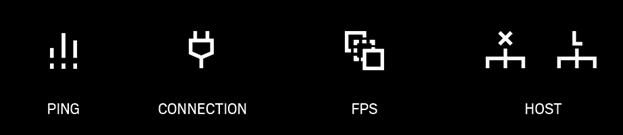
Generally, the icons appear in two colors:
- Yellow: A warning. The issue is present and may be affecting your gameplay.
- Red: Critical. The issue is severe and is very likely causing significant problems like lag, hit registration failure, or disconnections.
Connection-Related Icons
These icons appear when there’s an issue with the data traveling between your PC and the Rainbow Six Siege servers.
1. High Latency (Ping) Icon
- What it means: This icon, which often looks like a small speedometer or clock, indicates that your “ping” is high. Ping is the time it takes for data to travel from your game to the server and back, measured in milliseconds (ms). A yellow icon might appear around 80-100 ms, while a red one signifies a much higher, often unplayable ping.
- What you’ll experience:
- Dying behind cover: On your screen you are safe, but due to the delay, the server still sees you in the open.
- Delayed actions: Firing your weapon, deploying gadgets, and vaulting will have a noticeable delay.
- Your shots not registering correctly. The server may reject your hits because, by the time your shot data arrives, the enemy has already moved.
- How to fix it:
- Check your Data Center: Ensure you’re connected to the nearest server in the game’s options file or main menu.
- Use a Wired Connection: An Ethernet cable provides a much more stable connection than Wi-Fi.
- Limit Network Usage: Stop any large downloads, streaming, or other high-bandwidth activities on your network.
2. Packet Loss Icon
- What it means: This icon, which looks like several stacked rectangles with one flying away, means that some of the data “packets” from your game are getting lost on their way to the server (or vice-versa).
- What you’ll experience:
- Rubber banding: You’ll appear to snap back to a previous position.
- Shots or actions not registering at all, as if they never happened.
- Players appearing to teleport instead of moving smoothly.
- How to fix it:
- This is often a sign of an unstable connection. A wired connection is the best solution.
- Restart your router and modem.
- Contact your Internet Service Provider (ISP) if the problem persists, as it could be an issue with their network.
3. Jitter (Latency Variation) Icon
- What it means: This icon, which looks like a jagged line graph, indicates that your ping is unstable. Even if your average ping is low, it might be spiking up and down rapidly. This inconsistency (jitter) confuses the server.
- What you’ll experience:
- Inconsistent gameplay that feels unpredictable. One moment it’s fine, the next you’re lagging.
- Stuttering movements for both yourself and other players.
- Similar effects to both high latency and packet loss, often in short, frustrating bursts.
- How to fix it:
- Jitter is almost always caused by network congestion or Wi-Fi instability.
- Prioritize a wired connection.
- Reduce the number of devices connected to your Wi-Fi network.
Performance & Server Icons
These icons relate to the performance of your computer or the game server itself.
4. Update Rate (FPS) Icon
- What it means: This icon, often showing a monitor with “FPS” on it, appears when your frame rate (Frames Per Second) is too low or unstable. The game client sends updates to the server tied to your frame rate. If your FPS drops, so does your update rate.
- What you’ll experience:
- Stuttering and choppy gameplay on your screen.
- The server may reject your hits because you are not providing it with timely information about your actions.
- The server may induce artificial latency on your character to prevent other players from seeing you as a stuttering, teleporting model.
- How to fix it:
- Lower your graphics settings: Reduce texture quality, shadows, and anti-aliasing.
- Update your graphics drivers: Ensure you have the latest drivers for your GPU.
- Close background applications: Applications like web browsers, Discord (with hardware acceleration on), or recording software can consume system resources.
5. Server Instability (Host) Icon
- What it means: This icon, which looks like a server box with a plug and a warning symbol, indicates that the game server itself is having problems. This is not your fault.
- What you’ll experience:
- Everyone in the match will experience the same issues: rubber banding, hit registration problems, and general lag.
- The icon will be visible for all 10 players in the lobby.
- In severe cases, the match may end abruptly and you might be disconnected.
- How to fix it:
- You can’t. The issue is on Ubisoft’s end. You can check official Rainbow Six Siege social media channels or server status websites (like DownDetector) to see if they have acknowledged an outage or problem. The only solution is to wait for them to fix it.

i am at 30 ping and i am rubberbanding all over the place and cant do anything about it
this is getting ridiculous. Was playing the game with absolutely no issues before the last update. Now i am rubberbanding like crazy with 30 ping and no way to fix this. I have tried all your solutions but nothing has worked. If this keeps up, I wont be playing any longer
Unfortunately we are not Pro League so no matter what we as non-Pro League players say is irrelevant.
R6S has nothing but drama with connections, ping abuse, Crashes, hackers, nerfing the wrong operators because of pick rate instead of realising they have a high pick rate because they haven’t been broken by ubisoft. But soon they will have nerfed every single operator then re-nerf them again instead of focusing on anti-cheat server latency, connection issues, MMR penalties, Toxic bans for being an adult on an adult game. Give or take the game only has a year or so left regardless of how many more rubbish operators are brought into the game.
I have 9 ping very very good internet (Lan cable)
but still connection problems
me too